Concept
Safe Exam Browser is a web browser environment to carry out e-assessments safely. The software turns any computer temporarily into a secure workstation. It controls access to resources like system functions, other websites and applications and prevents unauthorized resources being used during an exam.
General Concept
SEB runs on a local computer and it is connected via the internet to a learning management system (LMS) or an e-assessment system. Generally SEB works with any web based LMS and other kinds of web based exam systems. Currently, the widely used learning management systems Moodle, ILIAS, OpenOlat, Open edX, Canvas LTI-Gators-for-Honor and Canvas Safe Online Exam as well as the e-assessment systems of the SEB Alliance contributors offer an exam mode explicitly compatible with SEB.
SEB does not connect to any central server or cloud service! SEB Server, which can optionally be used, is an independent open source software component which can be installed on a self-operated server. SEB clients can then be connected to such an SEB server instance using individual configuration files. This is strictly optional and must be configured individually in any case. If an SEB client has been configured to connect to an SEB server instance, this will be indicated to candidates when starting an exam session and video/audio proctoring/support must be explicitly agreed to by each exam candidate in a dialog box. For more information see our privacy statement.
Architecture
SEB consists of a kiosk application and a browser part, which are running on an examination computer or tablet device. The kiosk application locks down the examination computer, the browser part communicates over the internet (or a LAN) with the quiz module of an LMS running on a server.
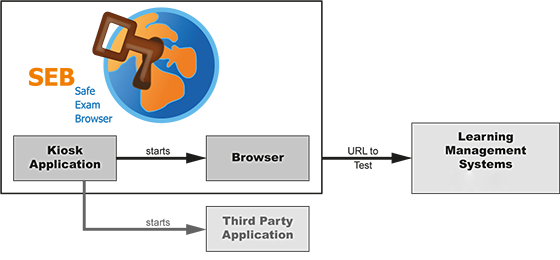
Schematic illustration of an online exam with Safe Exam Browser and a Learning Management System (LMS) or an e-assessment suite. In addition, a third party application can be allowed to run at the same time, for example Eclipse, Matlab, Excel or R.
Components
The illustration above shows the two internal components which SEB consists of, the kiosk application and the browser part. The third part of an SEB exam environment is build into the supported LMS. Optionally one or several third party application(s) can be allowed to run during an exam and are started by the SEB kiosk application.
- The kiosk application locks down the computer and starts the SEB browser plus optional third party applications. Since this application has to control miscellaneous OS functions, it is designed very system specific.
- The SEB browser loads and displays the LMS exam page using a preset URL and doesn't show any navigation elements like address bar, search engine field etc. The Windows version of SEB currently uses the Mozilla Gecko browser engine, either in the form of Firefox or XULRunner. SEB for macOS and iOS use the WebKit browser engine.
- The learning management systems contain so-called quiz modules, which are used for online exams. SEB relies on extensions/skins to the quiz modules in the Learning Management Systems or the e-assessment suites. for secure exams. With these extensions the user interface of the LMS is reduced to just contain navigation for the exam (no links to other pages outside the quiz) and no other undesirable features like messaging. An exam can also be configured to run only with SEB, not another browser. These SEB LMS extensions, which originally had to be installed separately to achieve this connectivity with SEB, have been integrated into the LMS in recent versions of OpenOlat, Open edX, ILIAS and Moodle.
SEB for Windows
Safe Exam Browser for Windows consists of the SEB kiosk application, which opens an own Windows desktop and blocks system commands like keyboard shortcuts (for example ALT+F4) and right mouse button clicks. The second part is Firefox, running in a so-called XUL runtime mode. The SEB XUL browser application running on Firefox connects to the LMS, using a pre-configured start URL. The SEB browser doesn't contain a URL or search field and navigation controls (back/forward, reload) can be disabled.
SEB for macOS and iOS
In contrast to the Windows version, Safe Exam Browser for macOS and iOS is a monolithic application using a web browser framework instead of a browser runtime. It's using the WebKit engine, on which Safari and some open source browsers are based. Otherwise, SEB for macOS/iOS connect to the Learning Management Systems in the same way as the Windows version.
Configuration
Safe Exam Browser enables secure exams on unmanaged computers like students' own laptops and tablets as well as in managed environments on all three platforms Windows, macOS and iOS. Starting version 2.0, SEB offers an individual configuration per exam, which is protected by a strong encryption against manipulation. Thanks to an elaborate authentication feature, the exam system can verify that a particular, unaltered SEB version and the correct exam settings are used for an examination. This facilitates secure exams especially on unmanaged computers like students' own laptops/tablets.
Safe Exam Browser 2.0 and later is a unified version which brings almost the same features, exam system interface, compatible configuration files and a very similar user interface onto all three platforms, while still taking in account operating system differences and unique platform specific features.
Features
General Features
- Managed web browser, which can be configured using encrypted configuration files
- Using special hyperlinks, SEB can be started from other web browsers and reconfigured individually per exam
- Fullscreen mode or multiple browser windows which can be resized (without any navigation elements), browser tabs on iPad
- VM detector: SEB detects whether it is running on a virtual machine or a jailbroken device and can refuse to start up
- URL filter to allow accessing only specific web sites, pages or resources
- Certificate pinning to prevent man-in-the-middle attacks on the connection to exam servers
- Spell checking and dictionary lookup is disabled, can optionally be allowed
- Built-in connection to Moodle, ILIAS, OpenOlat, Inspera Assessment and others, can be used with basically any web-based examination system
SEB for Windows
- Disabled actions (in default settings):
- Windows Task Bar and the Start Menu
- Switch to other applications invoked by Alt+Tab or Windows+Tab (unless permitted)
- Menu options on the Windows Security Screen invoked with Ctrl+Alt+Delete are removed while SEB is running
- Display and system idle sleep
- Print Screen and some other keyboard shortcuts like ALT+F4
- VMware shade (toolbar) when using VMware Horizon View Client for VDI
- Process monitoring hides or terminates not allowed processes while SEB is running
- Separate configuration tool with graphical user interface
- Third party applications can be allowed to run together with SEB, they can be started or switched to with icons in a SEB taskbar or the Alt+Tab shortcut
- Configurable spell checking dictionaries
- Additional resources like web pages or whole sites, HTML and PDF documents, even full web applications can be used in exams
SEB for macOS
- Disabled actions:
- Quit SEB (can be disabled or protected by a quit password)
- macOS Dock and Menu bar
- Switch to other applications with process switcher (cmd+Tab/cmd+Shift+Tab)
- Force Quit window (cmd+opt+Esc)
- Normal reboot (ctrl+cmd+eject) and shutdown (ctrl+opt+cmd+eject)
- Hiding the application or minimizing the window, printing and Exposé
- Right-click (context menu)
- Optionally hyperlinks requesting to be opened in a new window, optionally only such directing to another server than the one of the current host
- Display and system idle sleep
- Context menu options in Flash fullscreen video players
- macOS screen capture
- Preferences window for easy set up, can be protected with an administrator password.
- Teach mode to easily create URL filter rules for restricting access to particular web sites/pages/resources.
- Third party applications can be allowed to run together with SEB, but only in an accordingly configured macOS user account
SEB for iOS
- Using the iOS built-in Assessment Mode (Automatic Assessment Configuration – AAC), which disables all unwanted system features even with BYOD. Also blocking screen capture using AirPlay or Lightning/USB-C cable.
- Students cannot switch to other apps, access other websites or communicate with other students during an exam. Note that you need to set up a SEB Quit Password for the secure mode to be active!
- Notifications, FaceTime/voice calls and screen shots are also blocked.
- In-app settings for easy set up, can be protected with an administrator password.
- QR codes can be used to start exams with individual settings or to configure the SEB client to load an individual exam system start/portal page.
- Supporting deployment of SEB settings using a mobile device management system, as it supports the iOS feature "MDM Managed Configuration".
Technical Details
SEB for Windows
- Supported operating systems:
- Windows 8.1
- Windows 10
- Windows 11
- License: Mozilla Public License (MPL), includes a non-open-source binary security module.
- Browser engine: Chromium Blink
- Programming languages and frameworks:
- C# (.NET)
- JavaScript
- CefSharp (Chromium Embedded Framework CEF3).
SEB for macOS
- Supported operating systems:
- macOS 13 Sonoma
- macOS 13 Ventura
- macOS 12 Monterey
- macOS 11 Big Sur
- macOS 10.15 Catalina
- macOS 10.14 Mojave
- macOS 10.13 High Sierra
- macOS 10.12 Sierra
- OS X 10.11 El Capitan
The older OS versions listed below are only supported by SEB 2.3.2. Modern web pages might not be rendered correctly. The SEB 2.3.2 Preferences window is not available (you need to use at least macOS 10.11 for editing SEB configuration files). Starting SEB 2.1.4, you explicitly have to allow SEB to run on these macOS versions (Preferences / Security / Enforce minimum macOS version). - OS X 10.10 Yosemite
- OS X 10.9 Mavericks
- OS X 10.8 Mountain Lion (TLS/SSL/CA certificate embedding into SEB configuration files and certificate pinning not supported)
- OS X 10.7 Lion (TLS/SSL/CA certificate embedding into SEB configuration files and certificate pinning not supported)
- Mac OS X 10.6 Snow Leopard (only supported up to SEB 1.5.2)
- License: Mozilla Public License (MPL)
- Browser engine: WebKit (as Safari). SEB uses the WebKit version installed on the system (WebKit version depends on macOS version).
- Programming language and system framework: Objective-C/Swift (Cocoa)
SEB for iOS
- Operating systems:
- iOS 17
- iOS 16
- iOS 15
- iOS 14
- iOS 13
- iOS 12
- iOS 11: Supported by SEB 3.3.2, newer versions require at least iOS 12.
The older iOS versions listed below are only supported by SEB 2.1.17, which lacks many features of SEB 3.0 and newer: - iOS 10
- iOS 9.3.5
- License: Mozilla Public License (MPL), includes a non-open-source binary security module.
- Browser engine: WebKit (as Safari). SEB uses the WebKit version installed on the system (WebKit version depends on iOS version). Currently UIWebView is used.
- Programming languages: Objective-C, Swift
License
Safe Exam Browser © 2010-2026 ETH Zurich, IT Services, based on the original idea of Safe Exam Browser by Stefan Schneider, University of Giessen
Project concept: Dr. Thomas Piendl, Daniel R. Schneider, Damian Büchel, Dr. Dirk Bauer, Kai Reuter, Tobias Halbherr, Karsten Burger, Marco Lehre, Brigitte Schmucki, Oliver Rahs.
Safe Exam Browser is released as freeware. The source code is subject to the Mozilla Public License Version 1.1 (the "License"); you may only use these files in compliance with the License. You may obtain a copy of the License at http://www.mozilla.org/MPL/ .
Accessibility Statement
All Safe Exam Browser (SEB) versions were prepared to be as accessible as our concept of a secure environment allows. Conformance level AA of the Web Accessibility Guidelines WCAG version 2.1 was aimed for SEB on iOS, macOS and Windows.
Information and useful tips on the peculiarities of the individual SEB versions with regard to accessibility as well as some restrictions regarding individual violations of WCAG success criteria are listed below:
SEB for Windows
- Safe Exam Browser does not allow the use of custom user styles. SEB for Windows does come with a function to adjust the text size, but not for other stylistic aspects such as Text Spacing (WCAG 1.4.12)
- No New Desktop Kiosk Mode
- No "Create new desktop" Kiosk Mode: The "Create new desktop" mode (SEB Configuration Tool > Security > Kiosk mode) does not work with tested screen readers (NVDA & JAWS).
- Use Disable Explorer Shell Kiosk Mode instead: Alternatively, SEB can be run in Disable Explorer Shell Kiosk Mode.
- Action Center: [Win] + [A]:
- The Action Center can be displayed from the left edge of the screen using the keyboard shortcut [Win] + [A].
- The Action Center is not conveniently accessible in the current release for screen reader users. However, all relevant functions in the Action Center are accessible via the taskbar.
- Keyboard shortcuts:
Safe Exam Browser ensures that most relevant Windows operating system keyboard shortcuts also work within SEB. Mentioned are - Taskbar/Dock: [Win] + [D] as well as [Win] + [T]; Navigate with [Tab] within taskbar.
- Task view: [Alt]+[Tab]
- Browser address bar: [Ctrl]+[L]
- Action Center: [Win] + [A]
A detailed compilation of the conformity of the individual WCAG success criteria can be found in the Voluntary Product Accessibility Template document VPAT SEB for Windows (WCAG Edition)
SEB for macOS
- Safe Exam Browser does not allow the use of custom user styles. However, SEB for mac OS has a function for adjusting the text size, but not for other stylistic aspects such as Text Spacing (WCAG 1.4.12).
- For aspects of use using touch gestures, please refer to the iOS version of SEB.
- Activate the "Use keyboard navigation to move focus between controls" checkbox (System Settings > Keyboard > Shortcuts) to enable keyboard operability.
- Access menu bar and status bar using VoiceOver key (VO) + M shortcut when using Voice Over and ^F2/F8 (control + F2) when navigating keyboard only. Note that on modern Mac keyboards with default settings, you usually need to press the fn key to access function keys, for example ^ + fn + F2 to go to the menu bar.
- Go to SEB Dock with keyboard shortcut: control + shift + fn + F3
- For now, this Accessibility Statement is exclusive of the (built-in) SEB configuration interface (SafeExamBrowser > Settings), which is not used in exam mode.
A detailed compilation of the conformity of the individual WCAG success criteria can be found in the Voluntary Product Accessibility Template document VPAT SEB for macOS (WCAG Edition)
SEB for iOS
- Safe Exam Browser does not allow the application of custom user styles. SEB for iOS does come with a function to adjust the text size, but not for other stylistic aspects such as Text Spacing (WCAG 1.4.12)
- Special keyboard shortcuts (when using an external keyboard):
- cmd + M: Open/close side menu
- cmd + R: Reload page (if reload for exam tab or additional/new tabs is enabled in SEB settings)
- cmd + F: Search text on page (if enabled in SEB settings)
- cmd + Q: Quit SEB session
- control + tab: Switch to next browser tab
- control + shift + tab: Switch to previous browser tab
A detailed compilation of the conformity of the individual WCAG success criteria can be found in the Voluntary Product Accessibility Template document VPAT SEB for iOS (WCAG Edition)
Privacy Statement
SafeExamBrowser (SEB) doesn't send any personal information to any centralized server and is not connected to any web analytics, user tracking or clickstream analytics service. Some data which can be considered to be personal (device type and name, operating system version, computer account user name, local network host name, some URLs of opened web pages etc.) can be contained in the log files SEB saves on the system it is running on (when used with default settings). Log files are not transmitted to any centralized server by SEB, you can manually collect those log files for debugging purposes. Logging can be switched off in SEB's settings (Win/Mac).
If SEB clients have been optionally configured to connect to an instance of the SEB Server software component, the mentioned log data together with the username of an exam candidate from a supported exam system (currently Open edX, Moodle, OpenOlat and Ans, if configured to allow the SEB Server instance to connect to these independent systems) will be transferred to the individual SEB Server instance. SEB does not collect any other user data, but only loads and displays web pages and therefore does not "know" any details about individual exam users. As SEB can be used with various web-based examination systems, you have to make sure that those systems protect the examinees' data. SEB clients can be individually configured to connect to a video conferencing service (Jitsi Meet or Zoom) and transmit video/audio data from the camera and microphone of a client device via this video conferencing service. This is strictly optional and always disabled by default. If an SEB client has been configured to connect to a video conferencing service or SEB Server instance, this will be indicated to the candidates when starting an exam session and video/audio proctoring/support via a video conferencing service must be explicitly agreed to by each exam candidate in a dialog box.
There is no registration whatsoever required when downloading, installing or using SafeExamBrowser. SEB is not connecting to any cloud service or server, besides the web server which you enter as "Start URL" in your settings, and, when using appropriate individual configuration files, to an SEB server instance or a video conferencing service. When started with default configuration, SEB for Windows/macOS displays this page.
As SEB is open source, anybody can review the code to verify that SEB really doesn't connect to any centralized servers and is not sending any collected user data. Additionally, current SEB versions contain a security module to verifiy the integrity of the SEB application (and in some versions the operating system environment). This module is only distributed in binary form and for security reasons its source code is not available as open source. This module doesn't collect or send any personal information to any centralized server, it is not accessing the network or the Internet.
Acknowledgement
Important parts of this project have been carried out as part of the program "AAA/SWITCH –
e-Infrastructure for e-Science" lead by
SWITCH, the Swiss National Research and Education Network and the cooperative project "Learning Infrastructure" (part of the CRUS program "Information scientifique: accès, traitement et sauvegarde") coordinated by SWITCH, and was supported by funds from the ETH Board.
Support by the project program “Barrier-Free at ETH Zurich” helped to make Safe Exam Browser products accessible for people with disabilities in accordance with the international accessibility standards WCAG.